Upgrade Your Sound with KMise USB Audio Interface
Introduction to USB Audio Interfaces
A crucial component in the realm of music production and audio recording, a USB audio interface acts as the bridge between microphones, instruments, and a computer. By converting analog signals into digital data, these interfaces enable users to capture high-quality audio for a variety of applications, including music recording, podcasting, and streaming. In today’s digital age, the importance of sound quality cannot be overstated; it plays a significant role in the final production, affecting everything from clarity to overall listener experience.
The advent of USB audio interfaces has revolutionized the way artists, sound engineers, and content creators collaborate. Traditionally, setting up a recording studio involved a complex array of equipment, which could be costly and space-consuming. However, with the integration of USB audio interfaces, users can achieve professional-grade sound without requiring vast resources. These devices are compact and portable, enabling musicians and podcasters to record in various environments, from home studios to remote locations.
Additionally, a USB audio interface often includes features such as multiple input channels, phantom power for condenser microphones, and built-in preamps, which significantly enhance the sound captured during recordings. The flexibility and efficiency these devices offer make them suitable for users at every skill level, from beginners to seasoned professionals. As the demand for high-quality audio content continues to grow, understanding the role of a USB audio interface becomes increasingly essential in ensuring exceptional sound fidelity. By investing in this technology, users can elevate their projects, making audio recordings clearer, richer, and more engaging.
Why Choose the KMise USB Audio Interface?
The KMise USB audio interface stands out in the competitive world of audio interfaces by offering a remarkable combination of features that appeal to both novice and experienced audio professionals. At the core of its appeal is studio-quality sound that brings your recordings to life. The crystal-clear audio output is a significant advantage for musicians, podcasters, and sound engineers who require high fidelity for their projects.
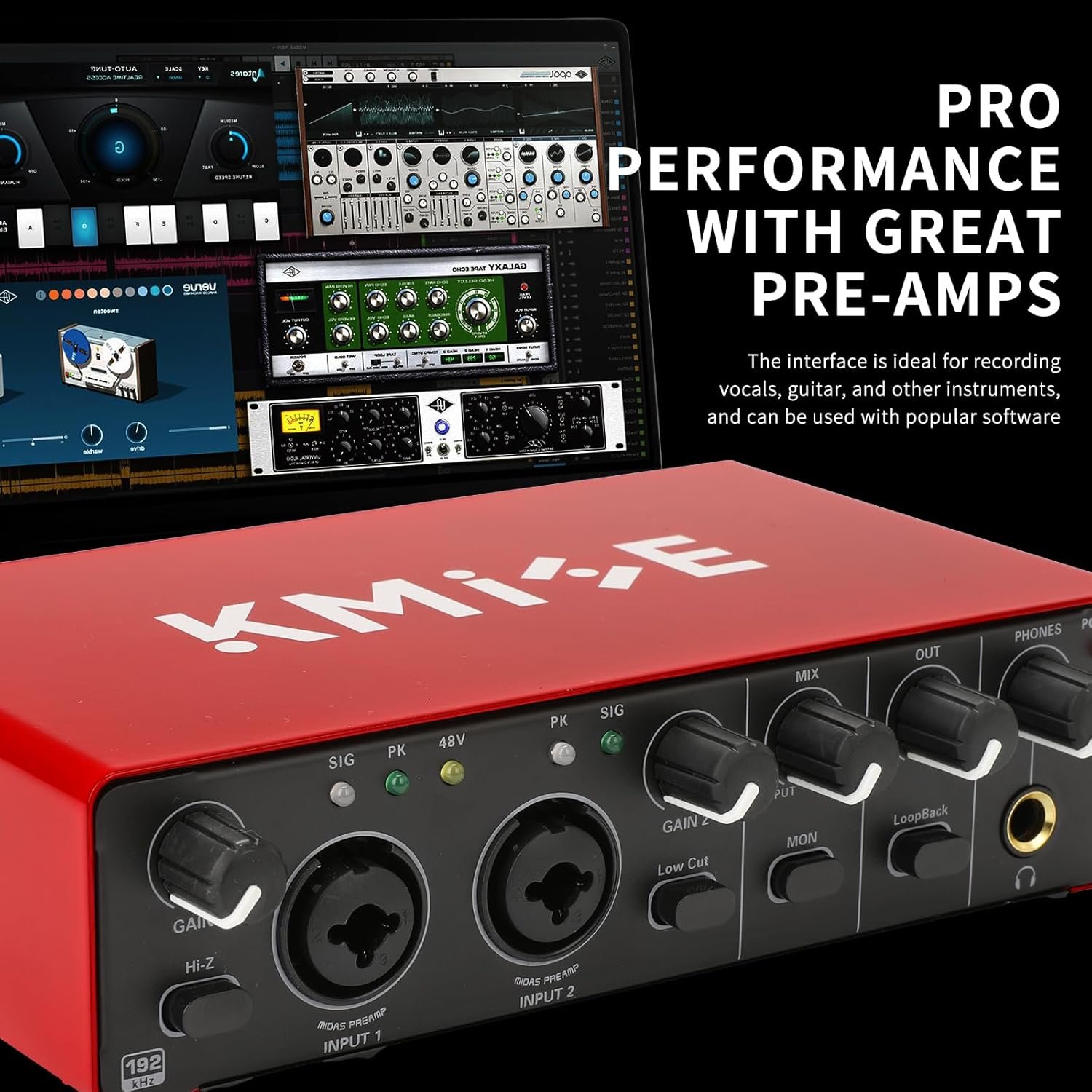
One of the key features of the KMise USB audio interface is its capability of providing 48V phantom power. This is particularly useful for those using condenser microphones, which are essential for capturing detailed vocals and intricate instrument sounds. With the ability to power multiple condenser mics, the KMise interface ensures that your recordings maintain a professional level of clarity, making it suitable for a variety of applications, from music production to voiceovers.
Moreover, the KMise USB audio interface demonstrates exceptional compatibility with diverse instruments and software. Whether you are connecting a guitar, keyboard, or a vocal mic, its design ensures seamless integration with different equipment, facilitating a hassle-free recording experience. This versatility results in an efficient workflow for musicians who may switch between instruments or use multiple recording setups.
What truly sets the KMise USB audio interface apart from other market offerings is its user-friendly interface and robust construction. With easy accessibility to input/output jacks and intuitive controls, users can navigate adjustments effortlessly, enhancing their overall experience. Additionally, its durable design makes it a reliable choice for on-the-go recording, ensuring longevity and dependable performance. For those seeking an audio interface that balances quality and convenience, the KMise USB audio interface is an outstanding choice.
Key Features of the KMise USB Audio Interface
The KMise USB audio interface is engineered to provide superior sound quality and an array of features that are suited for both amateur and professional audio enthusiasts. One of its standout specifications is the USB 3.0 Type-A connection, which ensures high data transfer rates and minimal latency. This makes it an excellent choice for recording and playback in real-time, enhancing the user experience significantly.
In terms of inputs and outputs, the KMise audio interface provides users with multiple options to connect various devices. It typically includes XLR and TRS inputs, allowing for versatile connectivity with microphones and instruments. Additionally, it features balanced outputs that reduce noise and crosstalk, ensuring that the sound remains clear and faithful to the source. This is particularly important for recording environments where sound fidelity is paramount.
The KMise interface also comes equipped with a built-in preamp. This feature is invaluable for users who want to amplify their audio signals without compromising quality. A quality preamp can significantly enhance the clarity and depth of sound, making it easier to capture nuances in recordings. Moreover, the USB audio interface may have adjustable gain control, enabling users to tailor the input level based on their individual needs.
Lastly, the KMise USB audio interface often includes additional features such as MIDI compatibility, allowing for seamless integration with MIDI devices. This versatility makes it an ideal tool for both music production and live performance setups. Overall, the KMise USB audio interface stands out with its robust specifications, presenting a compelling option for anyone looking to elevate their audio capabilities.
Setting Up the KMise Audio Interface
To set up the KMise USB audio interface for the first time, one must follow a series of straightforward steps to ensure optimal functionality. First, begin by connecting the device to your computer using the supplied USB cable. This connection typically does not require an external power source, as the device is powered through USB. Ensure that the other end is plugged into a free USB port on your computer for reliable communication between the device and operating system.
Next, it is essential to install the appropriate drivers for the KMise USB audio interface. While many operating systems will automatically recognize the device and install default drivers, for optimal performance, it is advisable to download the latest drivers from the KMise official website. Follow the installation instructions provided to ensure that the drivers are correctly implemented. After installation, restarting your computer may be necessary to finalize the setup process.
Once the device is connected and drivers are installed, the next step involves configuring your preferred audio software. Open the software and access the audio settings or preferences section. From here, select the KMise USB audio interface as the input and output device. This allows your software to utilize the interface effectively, ensuring high-quality sound capture and playback. It is also prudent to adjust the buffer size and sample rate according to your project requirements, as these settings can significantly affect audio performance.
If you encounter any issues, basic troubleshooting can assist in resolving them. Ensure all connections are secure, and verify that the audio software recognizes the interface. Checking for software updates may also resolve functionality issues. Following these steps will enable you to successfully set up and begin using your KMise USB audio interface effectively.
Best Practices for Using Your KMise Audio Interface
To achieve optimal sound quality when using your KMise USB audio interface, several best practices should be employed throughout your recording process. One of the most important factors influencing audio quality is microphone placement. Ensure that the microphone is positioned at an appropriate distance from the sound source. For vocal recordings, a distance of 6 to 12 inches is generally recommended, allowing the artist’s voice to be captured clearly without excessive room noise.
In addition to proper placement, adjusting the gain settings on your USB audio interface is crucial. Gain levels should be set to ensure that the input signal is strong enough to avoid excessive noise but not so high that it causes distortion. It may be beneficial to perform a few test recordings to find the perfect balance. As a guideline, aim for levels that peak around -12dB to -6dB on your recording software’s meters to ensure a clean sound.
Along with mic placement and gain adjustments, employing effective recording techniques can make a significant difference. For musicians, consider isolating your sound sources to minimize interference from other instruments. For podcasters, using a pop filter can significantly reduce unwanted plosive sounds. Additionally, be mindful of the acoustic environment by choosing a quiet space and utilizing soft furnishings to absorb ambient noise, which can improve the final output.
Experimenting with different techniques and settings will help you understand the capabilities of your KMise USB audio interface, ultimately allowing you to enhance the overall quality of your recordings. Documenting your adjustments and outcomes can also aid in replicating successful results in future sessions. Implementing these best practices will undoubtedly lead to a more polished and professional audio product.
Recording Guitar and Vocals with KMise
Recording high-quality guitar and vocal tracks requires careful consideration of several factors, especially when using a reliable device like the KMise USB audio interface. The quality of your recordings greatly depends on how you configure your recording environment, the microphones you choose, and the interface settings you use.
When planning to record guitar, start by selecting a suitable microphone. A condenser microphone is often preferred for vocals and acoustic guitar due to its sensitivity and wide frequency response. For electric guitars, a dynamic microphone can capture the nuances of an amp’s tone effectively. Positioning the microphone is vital; for acoustic guitars, try aiming at the 12th fret while keeping it about 6 to 12 inches away for a balanced tone.
Vocal recording with the KMise interface also merits attention. Ensure that the vocal mic is placed firmly in front of the vocalist at an appropriate distance to avoid distortion while maintaining clarity. Using a pop filter in front of the microphone can significantly reduce plosive sounds, improving the overall quality of the vocal tracks. Setting the input gain on the KMise USB audio interface appropriately is crucial; too high may cause distortion, while too low may lead to a weak-sounding recording.
In addition, consider the room acoustics in which you are recording. Soft furnishings can absorb sound and reduce unpleasant echoes, resulting in a cleaner recording. After setting up your microphone and adjusting the KMise audio interface, conduct test recordings to find the right balance before proceeding with your final takes. Utilizing these tips will considerably enhance the quality of your guitar and vocal recordings, allowing for a polished sound achievable with the KMise USB audio interface.
The KMise USB Interface for Podcasters
For podcasters seeking to elevate their sound quality, the KMise USB audio interface stands out as a reliable choice. This device serves as a bridge between your microphone and computer, converting analog signals into digital audio, which is essential for achieving a professional sound. The user-friendly design offers various inputs and outputs, allowing podcasters to connect multiple microphones and other audio sources seamlessly.
One of the primary advantages of using the KMise audio interface is its capacity to capture high-fidelity audio. By selecting a quality microphone and utilizing the interface’s preamps, podcasters can record vocals that are clear and vibrant. This capability is critical when creating content that engages listeners, as clarity plays a vital role in audio retention. Furthermore, the interface ensures low latency, enabling real-time monitoring while recording, which is essential for timing and delivery.
After recording, the editing and mixing process will enhance the overall sound quality further. Leveraging software compatible with the KMise USB audio interface, such as Audacity or Adobe Audition, allows podcasters to refine their audio. Techniques like equalization, compression, and noise reduction can significantly improve the final product. It is important to focus on removing unwanted background noise and balancing different audio levels to ensure immersive listening. Incorporating music and sound effects judiciously can also enrich the podcast experience.
In conclusion, the KMise USB audio interface equips podcasters with the tools necessary for achieving professional sound quality. By deploying it effectively and integrating it into a solid post-production workflow, creators can produce podcasts that will compete in the ever-burgeoning audio landscape.
Customer Reviews and Feedback
The KMise USB audio interface has garnered a wide array of customer reviews, providing insights into its performance and usability for both casual and professional users. Many users have praised the audio quality, indicating that it delivers clear and crisp sound, which is crucial for music production, podcasting, and streaming. The ease of installation and compatibility with various operating systems, including Windows and macOS, has been highlighted as a significant advantage, allowing users to set up the device without extensive technical knowledge.
Moreover, a common theme in the feedback is the interface’s affordability. Many customers noted that the KMise USB audio interface offers excellent value for its price, making it an attractive option for beginners and experienced users alike. Positive testimonials frequently commend its durable build quality, which reassures users about the longevity of their investment.
However, some reviewers have reported minor issues, such as occasional latency problems, especially when using multiple tracks. While these concerns are not universally experienced, they are worth noting for potential buyers who require real-time audio processing. Additionally, a few users expressed dissatisfaction with the customer support, stating that responses can be slow during peak times.
Overall, the KMise USB audio interface receives a balanced mix of praise and criticism. For individuals seeking a reliable and budget-friendly audio interface, it seems to fulfill many core requirements while still offering room for improvement in certain areas. Taking into account both the positive feedback and common issues can help prospective buyers make well-informed decisions regarding their purchase.
Conclusion and Call to Action
Investing in the KMise USB audio interface offers a transformative upgrade to your audio production experience. Whether you’re a musician, podcaster, or content creator, this device enhances sound quality by providing superior audio input and output options. The KMise USB audio interface is designed to deliver clear and professional sound, making it an indispensable tool for those serious about their craft.
One of the key advantages of the KMise USB audio interface is its user-friendly design, allowing both novices and seasoned professionals to navigate its features with ease. With high-resolution audio performance and versatile connectivity options, users can connect microphones, instruments, and additional hardware seamlessly. This versatility makes the KMise audio interface an ideal choice for various recording situations, whether in a home studio or on-the-go.
Additionally, the competitive pricing of the KMise USB audio interface makes it an accessible investment for anyone looking to elevate their audio game without breaking the bank. Supporting high-quality signal processing and low latency, it guarantees an enjoyable and efficient workflow. Furthermore, with the availability of special offers or limited-time discounts, now is the perfect time to consider integrating this audio interface into your setup.
In light of these benefits, I encourage you to explore the KMise USB audio interface further. Its capabilities, coupled with ongoing promotional deals, make it a worthwhile addition to enhance your audio projects. Don’t miss the chance to elevate your sound quality; consider making your purchase today and experience the difference firsthand.
Check It Out!