DigiTech FreqOut Feedback Pedal
As an Amazon Associate I earn from qualifying purchases.
The DigiTech FreqOut feedback pedal is for a particular moment. You hold the last note of a guitar phrase and want it to rise into feedback, but your amp is at living-room volume or you’re recording straight into an interface. The FreqOut adds that swell electronically. You can bring it in for one note with the footswitch, then release it before you start the next phrase.
That makes it an interesting pedal for players who already know where they’d use feedback. It’s a harder purchase to justify if you mainly want more sustain, a thicker lead tone or a pedal you can leave on through a whole set. Before giving it space on your board, think about what you want to hear after you pick the note.
What the FreqOut adds to your playing
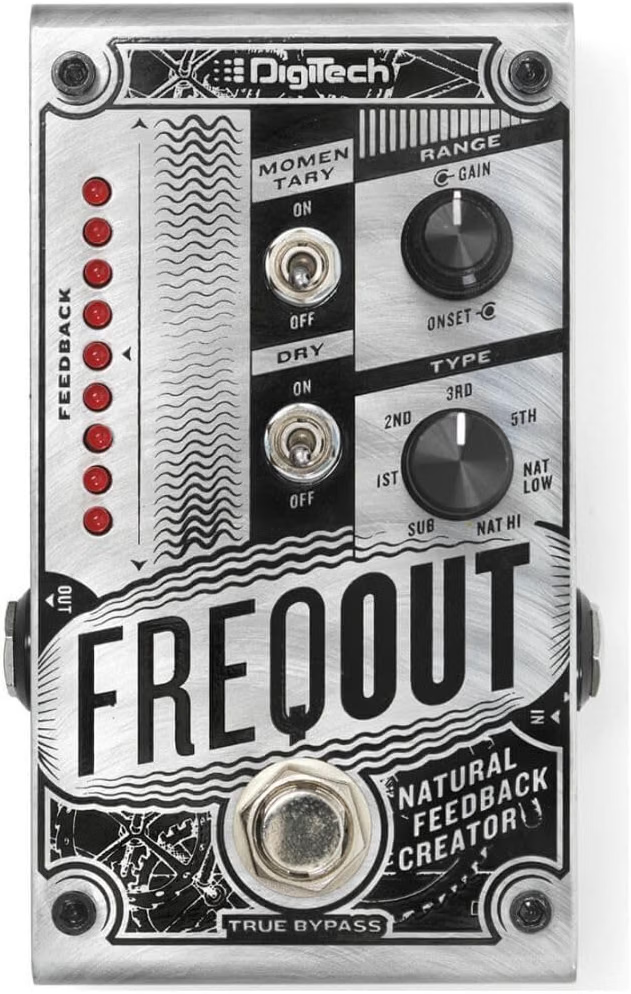
The FreqOut listens to your guitar signal and generates a feedback tone based on what you play. The Gain control sets how prominently that tone comes through. Onset sets how quickly it builds. A slower onset can leave the attack of a note clear and let the feedback emerge as the note rings. A quicker setting brings the effect forward when you have a shorter gap between phrases.
There are seven feedback types. Five target specific pitches relative to the note you play, including a sub-octave and several higher harmonics. The other two, Nat Low and Nat Hi, let the pedal respond more like amp feedback. Those modes can produce different results on the same note depending on how you play it. The fixed modes make more sense when you want to repeat a particular sound for several takes.
The Momentary switch lets you choose how the footswitch behaves. In momentary mode, you hold it down to use the effect and release it to switch the effect off. In the other mode, one press turns it on and another turns it off. You can also use the Dry switch to decide whether your original guitar signal stays audible while the effect is active. Keeping it on is a sensible starting point if you want the feedback to grow out of a phrase you’re already playing.
Where it makes sense at low volume
A home recording setup is an obvious fit. If you’re tracking a lead part quietly and want feedback on the final bend, you can build that sound into the performance without relying on a loud speaker in the room. The same idea applies to a direct pedalboard. If you use something like the BOSS IR-2 Amp & Cabinet Pedal for amp sounds and headphone practice, the FreqOut gives you a way to introduce feedback into that signal chain.
It can also be an arrangement tool. Try imagining a verse where the guitar stays fairly dry, followed by an exposed note that blooms just before the next section begins. Because you can choose when the effect comes in, it’s possible to give that single note a different character without changing your basic sound for the rest of the song. A little space around the note helps the listener hear the change.
Why you might skip it
You want your original note to last longer
If your main complaint is that a bend dies too quickly, ask whether you actually want to hear a new harmonic take over. The FreqOut adds a feedback tone. If you love the sound of your original note and simply want more time to hold it, that added pitch can pull attention away from the part you were trying to improve.
Listen to where the problem happens. If one particular fret always dies sooner than the others, investigate the guitar first. If the sound disappears as soon as you pick lightly, check whether a noise gate is shutting too early. If you want a more even lead sound across a whole phrase, a compressor or a change to your gain settings may be more useful. The FreqOut makes more sense when you can point to a musical moment that needs the sound of feedback itself.
You mainly play chords or fast riffs
A long single note gives the feedback time to build and leaves room for the added pitch. A chord already gives the ear several pitches to follow. Add a prominent harmonic and it may draw attention away from the chord voicing or clash with another part. DigiTech’s Nat Low mode limits the upper harmonics, which can help if you’re experimenting with chords, but you still have to decide whether the extra tone belongs in the arrangement.
Dense riffs present a different problem. A slow swell may barely register before you move on. Speeding up the onset can make the feedback more obvious, but it may also interrupt the rhythm you want to keep clear. Think about your usual set. If there are only one or two places where you leave a note hanging, decide whether those moments come up often enough to justify carrying a dedicated pedal.
You need the same result every time
A fixed harmonic gives you a more predictable target. The natural modes give you more variation, which can be expressive when you’re playing alone and less convenient when a band is waiting for a specific cue. Pickup choice, picking strength and the tone setting on the guitar can influence which harmonic comes forward. A setting you like on the bridge pickup may behave differently after you switch to the neck pickup.
There’s also a footwork question. Momentary operation is handy for a held note, but it ties up one foot for as long as you want the effect active. If the same transition also calls for a channel change or another pedal switch, rehearse the sequence before counting on it live. Latching operation frees your foot after the first press, though you still need to remember the second press when the effect is finished.
Your board is already short on space or power
DigiTech recommends putting the FreqOut first in the effects chain so it receives a clean signal from the guitar. On a simple board, that may mean moving one cable. On a packed board, it may mean changing where cables run or shifting pedals you already like to reach. Think about footswitch access too. A pedal you intend to hold down for a note needs a spot you can reach comfortably while you’re playing.
Check your power supply before buying. DigiTech specifies 9V DC and lists a typical draw of 235 mA. Its recommended external adapter is sold separately. A spare output marked 9V may still have too little current available, so check the output rating and polarity for the supply you already own. If you need to add a separate adapter or upgrade the board’s supply, factor that into the purchase.
You really want space around the guitar
Listen to the sound you’re trying to get in your head. If you’re hearing the original phrase repeat after you stop playing, a delay such as the MXR Carbon Copy addresses that directly. If you want notes and chords to leave a broad wash underneath the next phrase, the Strymon Cloudburst is an example of what ambient reverb can do. Both are ways of filling the space after a note, and either may fit more of your playing if the feedback pitch itself is incidental.
That distinction matters when you’re building a small board. A pedal can sound impressive on a single held note and still spend most of a rehearsal switched off. Picture using it in the quietest song you play and in the busiest one. If you can hear exactly where the swell belongs, you have a much better reason to make room for it.
Is the FreqOut worth a spot?
The FreqOut makes the strongest case for itself when you already have a phrase that calls for feedback and volume is what keeps you from getting it. A held bend in a home recording, a sparse lead line played through headphones or a feedback cue in a direct live rig all give it a clear purpose. If the idea still feels vague, play through a few of your own songs and mark the places where you’d actually press the switch. That will tell you more about its value to you than the number of modes on the dial.
For more ideas on shaping your guitar sound, browse the SwapStrings Effects & Pedals category.
As an Amazon Associate I earn from qualifying purchases.
Opens Amazon (paid link)