Direct to PA: Valeton GP‑50
The Night I Left My Amp in the Van
Three years ago, I played a show at a small club in Brooklyn. The stage was tiny – maybe twelve feet wide. The sound engineer looked at my 40‑watt tube combo and said, “That’s not going to work. Put it backstage and I’ll mic it.”
So I did. But backstage, the amp was surrounded by concrete walls. The mic picked up every reflection. My monitor mix was a mess. I couldn’t hear myself. The show was stressful, and my tone was buried under the drums.
Afterwards, the engineer said, “You know, you could just use a direct rig. Half the bands here do.”
I didn’t listen right away. I loved my amp. But over the next year, I watched more and more guitarists show up with only a small pedalboard. They plugged into a direct box, handed an XLR to the sound guy, and got perfect tones every night. No stage volume battles. No inconsistent miking. No heavy lifting.
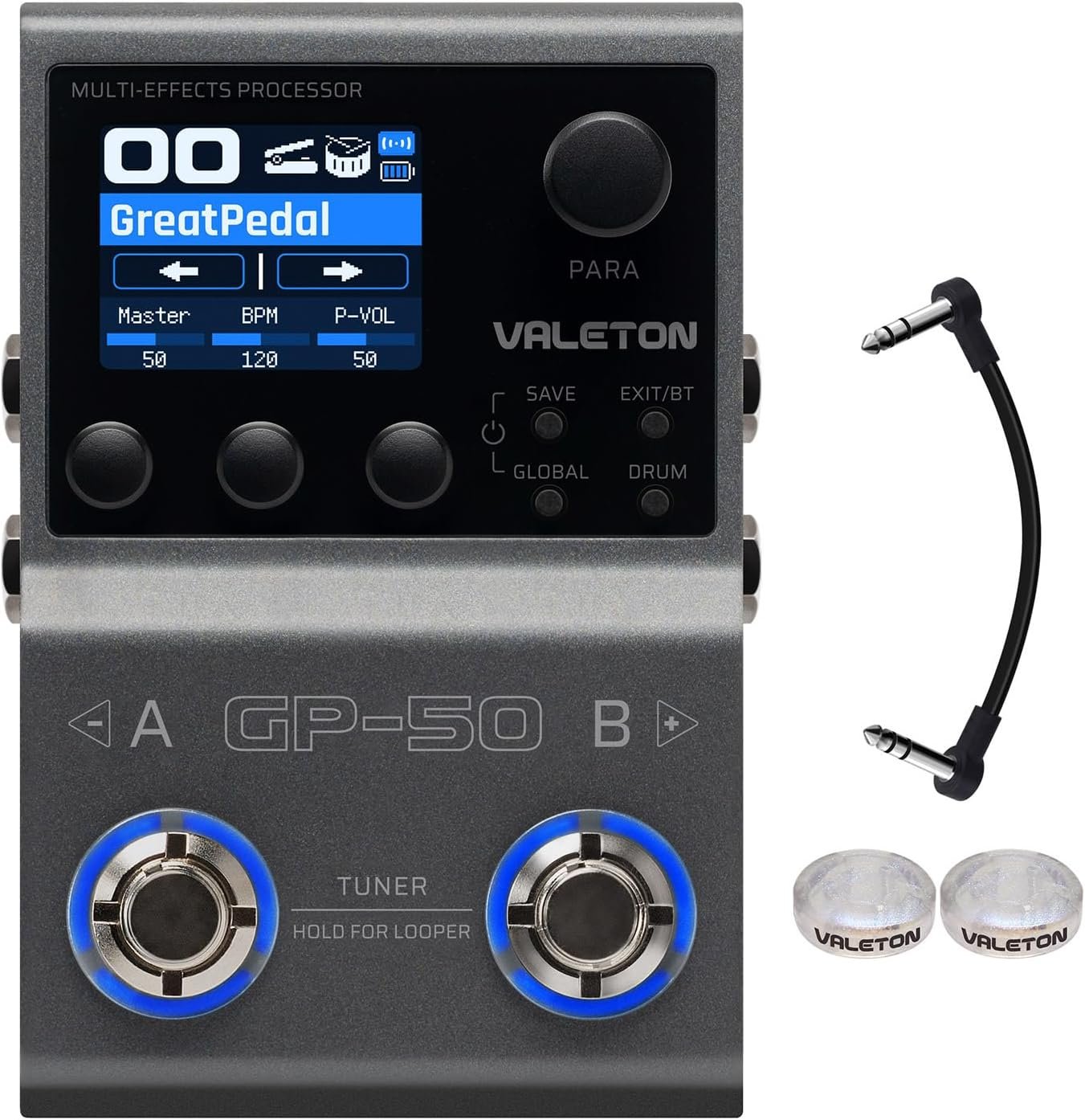
That’s when I discovered the Valeton GP-50 direct recording interface – a pedal that acts as your amp, cab, effects, and audio interface all in one. It’s a live amp replacement pedal that works for both stage and studio.
In this article, I’ll show you exactly how the GP‑50 replaces your traditional amp for live shows, how it simplifies recording, and why so many touring musicians are making the switch. No hype – just honest benefits and real‑world examples.
Why “Amp in the Room” Doesn’t Matter to the Audience
Let me say something controversial.
The audience doesn’t care about your tube amp. They don’t know about NOS valves or vintage transformers. They hear what comes out of the PA speakers. And if the PA is sending a muddy, uneven signal because your amp is too loud or poorly placed, your tone suffers.
Problems with traditional amps on stage:
- Stage volume wars – You turn up to hear yourself. The bassist turns up. The drummer plays harder. The singer screams. The mix turns to mud.
- Inconsistent monitoring – What you hear on stage depends on where you stand relative to your amp. Move two feet, and your tone changes.
- Mic bleed – The vocal mic picks up your amp. The drum overheads pick up your amp. The sound engineer has less control.
- Heavy gear – A tube combo can weigh 40‑60 lbs. A head and cab can exceed 100 lbs. Your back hurts before the first song.
- Venue limitations – Some stages have no room for amps. Some clubs have strict noise ordinances. Some sound engineers refuse to deal with loud stage amps.
The live amp replacement pedal solves all of these by sending a balanced, consistent signal directly to the PA. Your tone is exactly what you dialed in at soundcheck. No variance. No bleed. No back pain.
The GP‑50 is that pedal.
How the GP‑50 Becomes Your Stage Rig
Here’s the signal chain for a direct‑to‑PA setup with the GP‑50:
Guitar → GP‑50 (amp + cab + effects) → Direct Box (if needed) → Mixing Console → PA + Monitors
The GP‑50 does the work of an entire guitar rig. It models your amp (using NAM technology), your speaker cabinet (using user‑loadable IRs), and your pedalboard (100+ effects). The output is a line‑level signal ready for a mixer.
But wait – the GP‑50 doesn’t have XLR out. That’s true. It has two ¼” unbalanced outputs. To connect to a professional PA system (which expects balanced XLR), you need an inexpensive direct box (DI). A passive DI like the Behringer DI400 or a better one like the Radial ProDI costs 20‑100. Plug the GP‑50’s output into the DI, then run an XLR to the stage snake. Problem solved.
Or, if your mixer has ¼” line inputs, plug directly. Many small venues and houses of worship accept ¼”. For large stages, use a DI.
The sound engineer will love you because you give them a clean, noise‑free signal with consistent level. No mic placement guessing. No feedback. No “can you turn your amp to the side?”
NAM + IR: Your Virtual Amp That Never Needs Miking
The heart of the GP‑50 as a NAM modeler with XLR out adapter (via DI) is its amp modeling and IR loader.
NAM (Neural Amp Modeling) gives you the dynamic response of real tube amps. When you go direct, many modellers sound static and lifeless. NAM changes that because it captures how an amp reacts to your pick attack, volume knob, and playing dynamics.
For live use, this means you can:
- Roll your guitar volume back for cleans without losing high end
- Dig in for natural overdrive that feels like a real amp
- Use an overdrive pedal in front (or inside the GP‑50) to push the virtual amp harder
IRs (Impulse Responses) replace the sound of a miked cabinet. Without an IR, direct guitar sounds thin and fizzy. Load a good 4×12 IR, and suddenly you have the thump and air of a real cab – without the stage volume.
Pro live IR tip: Use IRs that were captured with a dynamic mic (like an SM57) at a close distance. Those cut through the mix best. Save the roomy IRs for recording or in‑ear monitors.
The GP‑50 gives you 50 user IR slots. Before your next gig, load a few of your favourite cab IRs. At soundcheck, switch between them. Pick the one that sits best with the band mix.
9 Simultaneous Modules – Your Entire Pedalboard, No Patch Cables
On stage, you need to switch sounds fast – clean verse to dirty chorus to solo boost. The GP‑50 handles this with 100 patch slots and 9 simultaneous effect modules.
Example: A three‑song rock setlist
Song 1: Clean verse, overdriven chorus, solo boost
- Patch “CleanVerse”: Fender Twin, light comp, spring reverb
- Patch “DirtyChorus”: add Tube Screamer, increase amp gain, add delay
- Patch “Solo”: previous + graphic EQ boost at 1.5kHz, more delay feedback
Tap your footswitch to change patches seamlessly. No gaps. No pops.
But what if you want to turn individual effects on/off like a traditional pedalboard?
The GP‑50 has Stompbox Mode. In this mode, the footswitches toggle individual effect blocks on and off. You can assign any effect to any footswitch. Want to turn delay on/off without changing your amp sound? Assign it. Want to engage a boost for a solo? Assign a graphic EQ or overdrive block.
You get the best of both worlds: preset‑based switching for big changes, stompbox‑style toggling for small tweaks.
USB‑C Recording Interface – From Stage to Studio in Seconds
The same pedal that serves as your live amp replacement pedal also works as a USB guitar pedal for DAW recording.
Connect the GP‑50 to your computer via USB‑C. It appears as a 2‑input, 2‑output audio interface. Open your DAW (Logic, Pro Tools, Ableton, Reaper, GarageBand). Create a new track. Set the input to “GP‑50.” Hit record.
You’re capturing your NAM amp model and effects directly to disk. No microphone. No room noise. No re‑amping needed. The tone you hear while playing is the tone that gets recorded.
Two recording modes:
- Wet only – Records your full processed tone (amp + cab + effects). Great for scratch tracks or final takes when you trust your preset.
- Dry + Wet – Records your clean DI signal on one channel and your processed tone on another. This lets you re‑amp later with different amp models or IRs – perfect for experimenting after the creative moment.
The Valeton GP-50 direct recording interface is bus‑powered via USB. No separate power supply needed when connected to a computer. This makes it an ultra‑portable recording rig. Throw it in your laptop bag with a guitar and headphones, and you have a mobile studio.
Real Touring Scenarios Where the GP‑50 Shines
Scenario 1: The Church Gig
Houses of worship often have strict volume policies. They also have excellent PA systems and in‑ear monitors. The GP‑50 is ideal. Set your patches at home. Show up with just your guitar and the pedal. Plug into a DI to the house system. The sound volunteer puts you in everyone’s in‑ear mix. No amp on stage means no complaints from the pastor or the congregation. You hear exactly what the congregation hears – perfect for dynamics and expression.
Scenario 2: The Corporate Event
You’re hired to play background jazz or pop covers at a wedding or corporate party. The event planner says, “No amps. Direct only.” The GP‑50 gives you pristine clean tones, a touch of reverb, and a compressor for smooth leads. You look professional with your small pedalboard. The client is happy because their stage looks clean.
Scenario 3: The Fly Date
You get a last‑minute gig in another city. You can’t bring your amp on the plane. Pack the GP‑50 in your carry‑on. Rent or borrow a guitar at the destination. Plug into the backline PA. Your tone is exactly what you use at home – no surprises. You sound like you, even without your gear.
Scenario 4: The Recording Session
You walk into a studio. The engineer has amazing outboard gear, but the amp room is booked. No problem. Plug the GP‑50 directly into the console or interface. Record your dry DI and processed tone simultaneously. Later, if the producer wants a different amp sound, you re‑amp using the dry track. The session stays fast and creative.
Bluetooth App – Soundcheck from Your Phone
Soundcheck is stressful. You have five minutes to dial in your tone while the drummer hits every drum and the bassist plays a slap solo.
With the GP‑50’s Bluetooth app, you can adjust your presets wirelessly from anywhere on stage. Need more reverb on patch 3? Open the app on your phone, tap the reverb block, increase the mix. No bending down. No squinting at a tiny screen.
The app also lets you:
- Reorder your setlist – Drag patches into performance order. Assign them to footswitch banks.
- Name patches with setlist titles – Instead of “Patch 12,” name it “Wonderwall Solo” or “Verse Clean.”
- Backup before a tour – Save all 100 patches to the cloud. If your pedal ever gets corrupted (unlikely but possible), restore from your phone.
- Share patches with bandmates – Email or text your preset files. Build a shared tone library.
The USB guitar pedal for DAW functionality combined with Bluetooth editing makes the GP‑50 a dream for modern touring musicians.
Pros and Cons – Real Talk for the Working Player
Pros ✅
- Eliminates stage volume wars – No amp means cleaner front‑of‑house mix
- Consistent tones every show – No room acoustics or mic placement variables
- Ultra‑lightweight – 1.2 lbs vs. 40+ lbs for an amp
- NAM dynamics – Feels like a real tube amp, not a static model
- IR loader – Any cab sound you want, from vintage 2×12 to modern 4×12
- Bluetooth app – Wireless editing during soundcheck
- USB‑C audio interface – Records dry and wet simultaneously
- 100 patch slots – Entire setlist stored and recallable
- 9 simultaneous modules – Complex chains without extra gear
- Stompbox mode – Toogle individual effects on/off
- Works for guitar and bass – One pedal, both instruments
- Includes Volktone TRS cable – Freebie for expression pedal or stereo link
Cons ❌
- No XLR output – Requires an external DI box for professional PA systems (adds ~20‑100)
- No built‑in microphone preamp – Can’t plug a vocal mic into it (but that’s not its job)
- Learning curve – NAM, IRs, and signal chains take time to master (but the app helps)
- No speaker simulation defeat for real cabs – If you want to use a real power amp and cab, you’ll need to turn off cab IRs manually
- Plastic knobs – Fine for stage, but metal would feel more premium
Honestly, the XLR issue is minor. Many guitarists already carry a DI box for acoustic guitars or as a backup. If you don’t have one, buy a $20 passive DI – it’s a one‑time cost that solves the problem permanently. Or use a ¼” to XLR cable if the console can accept unbalanced signals (most modern digital mixers can).
How It Compares to Other Direct Rigs
| Solution | Weight | Sound Quality | Flexibility | Cost | XLR Out? |
|---|---|---|---|---|---|
| Traditional amp + mic | 40‑100 lbs | Great (but variable) | Low | High | No (needs mic) |
| Kemper Profiler Stage | 5 lbs | Excellent | Very high | Very high | Yes |
| Line 6 Helix Stomp | 1.5 lbs | Very good | High | High | No |
| NUX MG-30 | 1.8 lbs | Good | Medium | Medium | No |
| Valeton GP‑50 + cheap DI | 1.2 lbs + 0.5 lbs | Excellent (NAM) | Very high | Low + $20 | Via DI |
The GP‑50 plus a $20 DI box gives you pro direct tones for less than half the price of a Helix Stomp. The Kemper is in a different league price‑wise. For most working musicians, the GP‑50 is the sweet spot of price, performance, and portability.
Questions from Touring Musicians (Answered)
Q: Can I use it with in‑ear monitors?
A: Yes. Plug your in‑ear system into the GP‑50’s headphone out or the main outputs. The signal is your complete rig. You can also send the same signal to the PA and your ears simultaneously.
Q: How do I hear myself if there’s no amp on stage?
A: Use the venue’s monitor system (wedges or in‑ears). Since the GP‑50 sends a direct signal, the sound engineer can give you exactly what you need in your monitor. Many players prefer this because you hear the same tone as the audience.
Q: What if the PA fails?
A: Keep a small powered speaker (like a HeadRush FRFR or even a compact Bluetooth speaker with aux in) as a backup. Plug the GP‑50 directly into it. You have an instant personal monitor or emergency amp.
Q: Can I use my own impulse responses live?
A: Absolutely. Load up to 50 of your favourite IRs. I recommend tagging them by venue size – “SmallClubSM57,” “LargeRoomMD421,” etc. – so you can adapt quickly.
Q: Does the GP‑50 have a ground lift?
A: No, but your external DI box will have one. If you hear hum when connecting to a PA, engage the ground lift on the DI.
Q: Can I use it with a power amp and real guitar cab?
A: Yes, but disable the cab IR block. The GP‑50’s amp models will drive a power amp (like a Seymour Duncan PowerStage) and a traditional guitar cab. However, the cab won’t sound like the IR – you’re back to real speakers.
Q: How durable is it for touring?
A: The metal chassis is solid. The footswitches are rated for thousands of presses. I’d still recommend a soft case or pedalboard bag. The screen can scratch if you throw it loose in a hardware case.
Q: Can I update firmware without a computer?
A: Currently, firmware updates require a computer via USB. But you can use the app to update wirelessly for future releases – check Valeton’s website.
Building Your Ultimate Direct‑To‑PA Rig
Here’s a complete shopping list for a professional direct rig using the GP‑50:
- Valeton GP‑50 (obviously) – your brain
- Passive DI box – Behringer DI400 or Radial ProDI
- Two short ¼” instrument cables – one from guitar to GP‑50, one from GP‑50 to DI
- XLR cable – 15‑20 feet, from DI to stage snake
- USB‑C power bank – optional, for outdoor gigs without power
- Tuner – GP‑50 has a built‑in tuner (hold the footswitch)
- Expression pedal – optional, for wah or volume swells (uses the included Volktone cable)
Total extra cost beyond the GP‑50: as little as $30 for a basic DI and cables. You’ll earn that back on your first gig where you don’t have to rent a backline amp.
Why You Should Buy the GP‑50 Right Now
If you play live shows – any shows – the GP‑50 will make your life easier and your sound better.
You should buy it if:
- You’re tired of carrying heavy amps
- You want consistent tones from venue to venue
- Sound engineers keep asking you to turn down
- You play in a silent stage church or theatre
- You record at home and wish you could use the same rig live
- You travel for shows and need a carry‑on friendly rig
You should skip it if:
- You’re a purist who needs the physical air movement of a real 4×12
- You already own a Kemper or Fractal and are happy with it
- You never play anywhere except your basement where your cranked amp disturbs no one
For everyone else – and that’s most gigging musicians – the GP‑50 is a revelation. It’s the NAM modeler with XLR out adapter (via a cheap DI) that brings studio‑grade direct tones to every stage.
The live amp replacement pedal market has needed an affordable, high‑quality, NAM‑powered option. Valeton delivered.
Now it’s your turn.
Click below to order the Valeton GP‑50 from Amazon. The Volktone 15cm TRS cable is included free. Add a DI box while you’re there, or use the ¼” outputs directly into a mixer if yours accepts them.
Buy Valeton GP‑50 Direct Recording Interface on Amazon
Stop hauling amps. Start enjoying gigs again.
As an Amazon Associate, I earn from qualifying purchases.
Check It Out!